Turn Your Windows 7 PC Into Wi-Fi Hotspot For Sharing Internet
Hello Friends Thanks
for visiting My Website
Today i will tell u how
to Turn Your
Windows 7 PC Into
Wi-Fi Hotspot For Sharing Internet
Wi-Fi Hotspot For Sharing Internet
Windows 7 lets you
create wireless hotspot by means of which you can instantly share any internet
connection. This is useful in case you have a wired internet connection and
would like to share it with
your
laptop.
If you
have a Windows 7 laptop or PC connected to wired internet and also have a Wi-Fi
adapter, you can convert your Windows 7 PC into a Wi-Fi hotspot and share it’s
internet connection without the need of Wireless router. We earlier showed you
how to use a freeware “Connectify” to do it. But now we will show you how to do
it without any third party software.Here is a step-by-step guide on how to do it:
1. Connect your Windows 7 PC to internet. It can be Wired internet or wireless internet from 3G or Data Card.
2. Click Start—> Control Panel
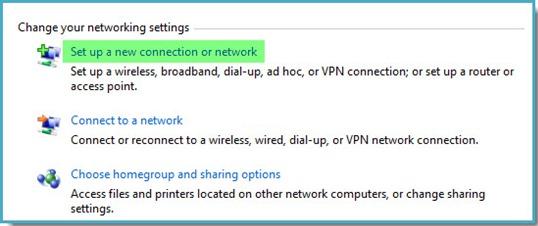
3. Set “View by: Category” and then click on “View network status and tasks”. (Refer image below)

4. Click “Set up a new connection or network”.
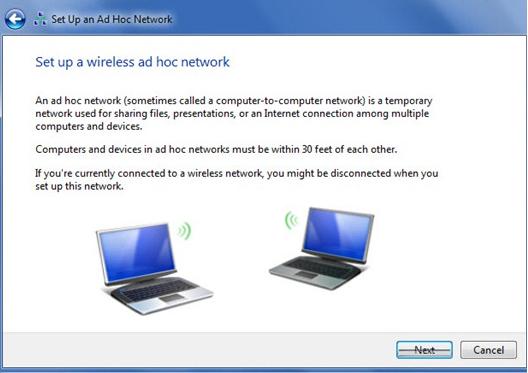
5. Select “Set up a wireless ad hoc (computer-to-computer) network” and then click “Next”.

6. Click “Next”
.
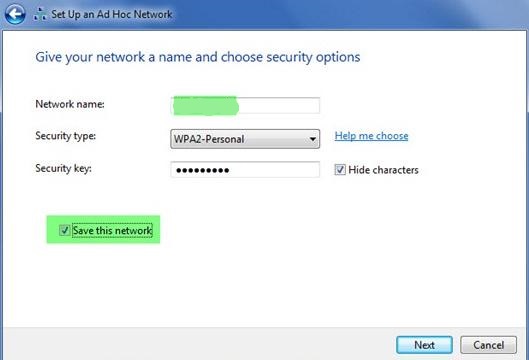
7. Give a name to your wifi network. Choose Security type as “WPA2-Personal” and give a security key.
Check the box “Save this network”. Click “Next”.
8. Windows will then show you the wifi hotspot name and network security key. You will have to enter this network security key when you connect to this wifi hotspot from another PC. Click “Close”.
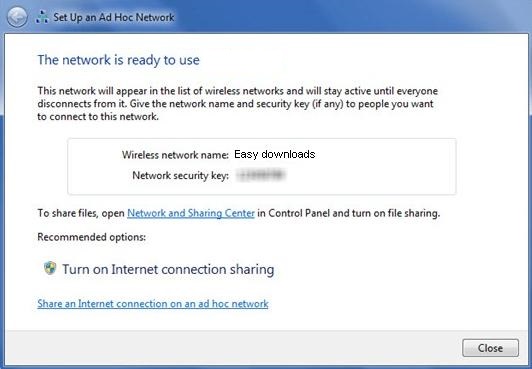
9. At this point you have now successfully created the wifi hotspot. Another PC can now connect to the wifi hotspot. But it will not have internet connection.
Hence you need to share the internet connection.
Follow Step 2 and Step 3 again. Then click on “Change adapter settings” in the left pane of “Network and Sharing Center”
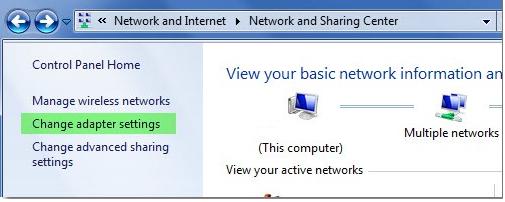
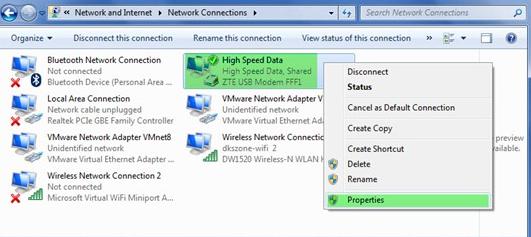
10. Select and right-click on the connection from which you are having internet and select “Properties”. For Data Card, it will be High Speed Data. If are using Wired internet via Ethernet cable, you need to choose “Local Area Connection”.
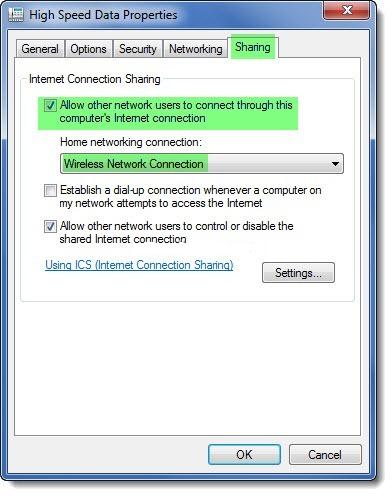
11. Click on “Sharing” tab. In “Internet Connection Sharing” section, check the box “Allow other network users to connect through this computer’s Internet connection” and choose the “Home networking connection as “Wireless Network Connection”. Click “OK”
You are done. Now you
should be able to access
internet in other PC